Making a Tool
Tools are items players can pick up, equip, and use.
Setting Up a Tool
- Insert a
Toolthen parent it to a playersInventory. - Add a
PartorMeshinside the Tool as the handle. This is what players see in their hand. - Optional. Set the
IconImageproperty so it shows up in the inventory bar.

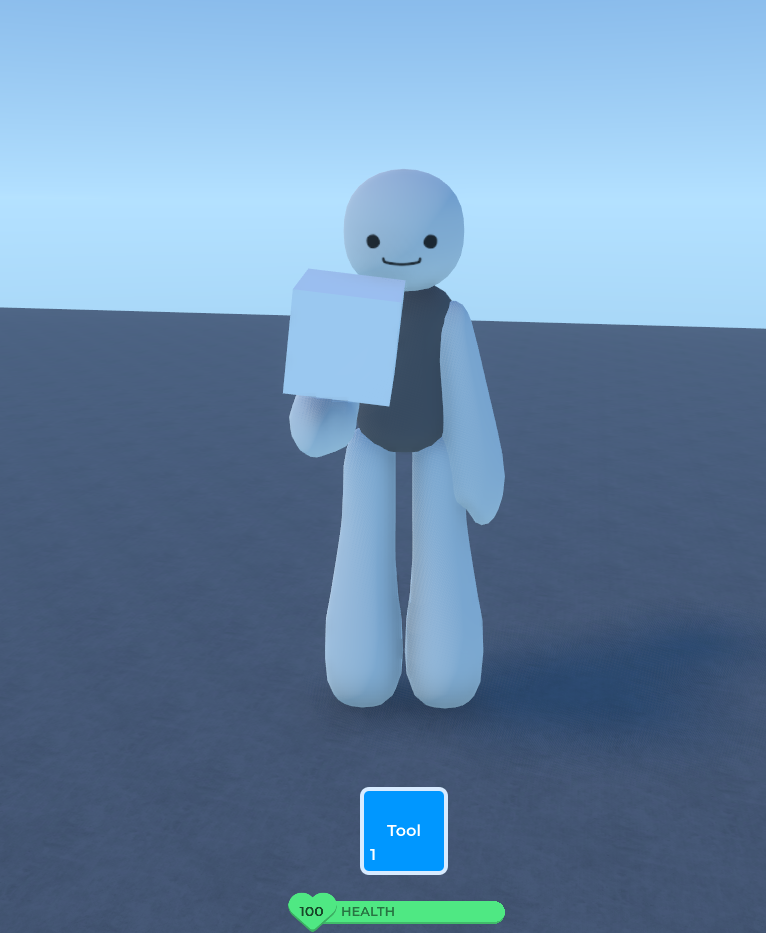
Equipping and Unequipping
These events fire when the player pulls out or puts away the tool:
local tool: Tool = script.Parent

tool.Equipped:Connect(function()
    print("Tool equipped!")
end)

tool.Unequipped:Connect(function()
    print("Tool put away.")
end)
Activating the Tool
Activated fires when the player clicks while holding the tool. Deactivated fires when they release the mouse:
tool.Activated:Connect(function()
    print("Swing!")
end)
Tool Animations
Play a built-in animation on the player holding the tool with PlayAnimation:
tool.Activated:Connect(function()
    tool:PlayAnimation("slash")
end)
Available animation keys: "slash" (a swing), "eat", and "drink".
Adding a Sound (optional)
Upload a sound in the Creator Dashboard to get a sound ID, then play it when the tool is used:
local tool = script.Parent
local sword = tool["Sword"] -- the Part or Mesh you named inside the Tool

local swingSound = Instance.New("Sound", sword)
swingSound.Name = "SwingSound"
swingSound.SoundID = 0 -- replace with your uploaded sound's ID
swingSound.Volume = 0.9

tool.Activated:Connect(function()
    tool:PlayAnimation("slash")
    swingSound:PlayOneShot(0.9)
end)
Client + Server Logic
ClientScript (inside the Tool):
local tool = script.Parent
local event = Hidden:WaitChild("ToolEvent")

tool.Activated:Connect(function()
    tool:PlayAnimation("slash")

    local msg = NetMessage:New()
    msg:AddString("action", "swing")
    event:InvokeServer(msg)
end)
ServerScript (in ScriptService):
local event = Hidden:WaitChild("ToolEvent")

event.InvokedServer:Connect(function(sender: Player, msg: NetMessage)
    local action = msg:GetString("action")
    if action == "swing" then
        print(sender.Name .. " swung the tool!")
        -- whatever here
    end
end)
Mini Project: The Boop Stick
A simple tool that pushes a specific part when you click.
- Create a
ToolnamedBoopStick. - Add a
Partinside it for the handle. - Create a
NetworkEventnamedBoopEventinsideHidden. - Place a unanchored
PartnamedTargetin the Environment.
ClientScript (inside BoopStick):
local tool = script.Parent
local event = Hidden:WaitChild("BoopEvent")

tool.Activated:Connect(function()
    tool:PlayAnimation("slash")

    local msg = NetMessage:New()
    msg:AddString("action", "boop")
    event:InvokeServer(msg)
end)
ServerScript (in ScriptService):
local event = Hidden:WaitChild("BoopEvent")
local target = Environment:WaitChild("Target")

event.InvokedServer:Connect(function(sender: Player, msg: NetMessage)
    if msg:GetString("action") == "boop" then
        target.Velocity = Vector3.New(10, 10, 0)
        print("Boop!")
    end
end)
Click to send the target flying.
Next: Saving Data with Datastores to keep player progress forever.