About Tags
Tags are a set of strings which you can use to identify each instance. For example, you may identify an object as "coin". You can do so by adding a tag to the object. One instance can have multiple tags.
Adding tags via Creator
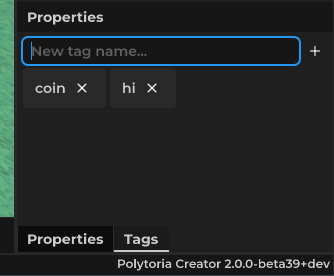
- Select an Instance, then switch to tags menu in the properties window.
- Type in tag name text field, then press the + plus icon
- And there you have the tag! To remove, press the X icon next to the tag.
Adding tags via Script
You can add a tag to an instance by using Instance:AddTag(string) and remove via Instance:RemoveTag(string). For example:
coin:AddTag("interactable")
Using tags
You can check if the object has the tag from the script using the Instance:HasTag(string) function which returns true if the object has the tag. Example usage:
player.Touched:Connect(function(hit: Physical)
    if hit:HasTag("coin") then
        coin += 1
    end
end)