Upgrading Godot Version
This page will guide you on how to upgrade the Godot version of the project, here's the remarks on the project's Godot version:
- The project should always be up-to-date with the latest stable version of Godot.
- An announcement should be made through the public channels to let other contributors know.
Upgrading the project
- Download the latest stable version of Godot (.NET)
- Open the project using the latest version
- Go to Project > Tools > Upgrade Project Files
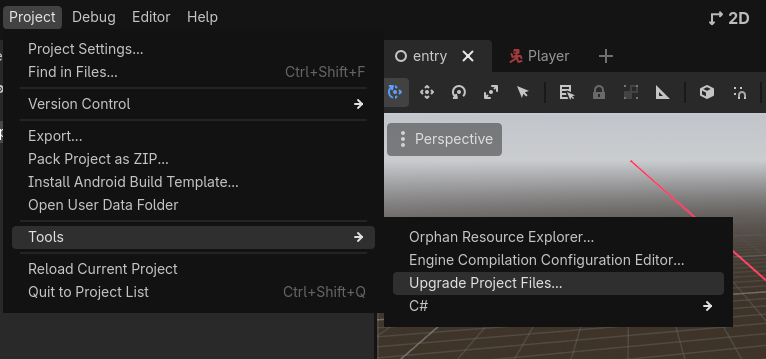
- Press Restart & Upgrade, and wait for upgrade process to complete
- Don't commit yet! There's also CI to upgrade below:
Upgrading the CI
- Change
GODOT_VERSIONindm-test.yamlandexport-checks.ymlto the latest stable version number (eg.4.6.2,4.7)
name: "Datamodel Tests"
on:
  workflow_dispatch:

env:
  GODOT_VERSION: 4.6.2  <--------------------------- Here
  DOTNET_CLI_TELEMETRY_OPTOUT: true
  DOTNET_NOLOGO: true
- Commit all these changes with appropriate commit message (eg. "Upgrade Godot -> 4.6.2")